
Skip to content
Supporto Spoki

Documentation for Spoki use

  • English
    • Italiano
    • Español
    • Português
  • English
    • Italiano
    • Español
    • Português

Integrations

34
  • Integrate WhatsApp with Google Sheets
  • Integrating Spoki with Facebook forms.
  • Integrating Spoki with Brevo (formerly sendinblue)
  • Integrating WhatsApp with Zapier
  • WhatsApp and WooCommerce Integration
  • Integrating WhatsApp with Hubspot
  • Integrating WhatsApp with Qapla’
  • Integrating WhatsApp with ActiveCampaign
  • Klaviyo and Spoki Integration.
  • Integrating WhatsApp with IFTTT
  • Integrate WhatsApp with Zoho
  • Integrate WhatsApp to WPNotif
  • Integrate WhatsApp with Semplisio
  • Integrating Spoki with Webhooks
  • Integrate Prestashop to WhatsApp
  • Integrate Spoki with any management system via API
  • Integrating Calendly with Spoki
  • Integrate WhatsApp with Google Calendar
  • How to send a Webhook out of Spoki vs. a management system
  • Integrating WhatsApp with Paypal
  • Zadarma
  • Embed Spoki on your Software
  • Spoki Integration with Connectif: Automating WhatsApp Messages
  • Integrate WhatsApp with Shopify
  • Insert Chat Button on Shopify
  • Get Started with Spoki MCP
  • Sync Klaviyo Lists and Segments with Spoki
  • Gorgias
  • Make
  • Shopify App
  • Ringover
  • Magnews Flow
  • Salesforce Flow

Platform

15
  • Lists
  • Dynamic fields
  • Import CSV from Lists
  • Apply for OBA (Official Business Account) WhatsApp
  • Ticket
  • How to verify the authenticity of Spoki emails
  • Contact
  • Dashboard
  • Chat
  • Campaigns
  • Template messages
  • Chat buttons
  • Tags
  • Integrations
  • Automations

How to

86
  • How to create a simple automation from the Campaigns section
  • Spoki on your Smartphone – Web App and Notifications
  • “Delay” Step: When and How to Use It
  • Quick Action “If/Else”
  • How to Filter Chats by One or More Tags/Agents/Lists/Tickets
  • Marketing Consent on Spoki: Operational Guide
  • Guide to the Branching Option in Automations
  • Introduction to Using the OTP Code
  • Guida allo step “Attendi risposta”
  • How to Upload a Contact List on Spoki: A Step-by-Step Guide
  • Crafting AI Prompts
  • How to send the content of a message to an external webhook
  • Multiple steps in automation
  • HOW TO TRACK CLICKS ON TEMPLATE MESSAGE LINKS: UTM
  • How to write documents for AI
  • Template suggested by Artificial Intelligence (AI)
  • How to create a marketing funnel on Shopify
  • Integrating Spoki with Meta Listings
  • How to build your own AI Agent
  • Restore all blocked contacts
  • Translate messages and replies if the contact has a different language
  • Transcription and translation of audio in chat
  • Permanently delete a contact on Spoki
  • How to export all messages from a chat as CSV
  • How to change media in the Template before sending it in chat
  • How to create a list for contacts in a specific automation step
  • New features of Active Campaign
  • How to populate a dynamic field
  • How to activate catalog display on WhatsApp
  • How to add Tag in automation before inserting it
  • How to generate a list from Campaign Statistics
  • How to segment clients within Automations.
  • How not to let your recharge expire
  • How to automatically manage who replies/does not reply to a message
  • How to terminate automation manually for specific contacts
  • How to terminate automation manually for specific contacts
  • HOW TO CREATE A LIST FOR CONTACTS IN A SPECIFIC AUTOMATION STEP
  • HOW TO GENERATE A LIST FROM CAMPAIGN STATISTICS
  • HOW TO ADD TAG IN AUTOMATION BEFORE INSERTING IT
  • New features of Active Campaign
  • How to change media in Template before sending it to chat
  • How to export all chat messages as CSV
  • Audio transcription and translation in chat
  • Delete contact permanently on Spoki
  • Train artificial intelligence (AI) on Spoki
  • Integrating Spoki with Meta Listings
  • How to set up a CTA with dynamic field
  • How to send the content of a message to an external webhook
  • How to automatically manage who replies/doesn’t reply to a message
  • Free messages with buttons
  • How to get a single contact out of all automations
  • Spoki – first steps
  • How to transfer contacts from your Whatsapp app to Spoki
  • How to handle cases when I have to send a chat reply to a customer after 24 hours?
  • How to withdraw from Spoki service
  • HOW TO LINK SPOKI TO FACEBOOK INTERACTION CAMPAIGNS
  • How to manage booking Calendly + Active Campaign + Spoki
  • How to consult automation reporting
  • How to send multi-language messages
  • How can I identify which user has replied in chat to a message?
  • How to populate a dynamic field via CSV upload and submit a campaign
  • How to enable automation for birthday greeting message
  • How to automatically handle those who do not respond
  • How to activate the Woocommerce plugin associated with Spoki Pro
  • How to enable automation for non-working hours
  • How to link Spoki to Facebook campaigns
  • How to activate an automatic message to run on holidays
  • How to link a Chat Button on the website to an automated response
  • How to insert WhatsApp chat button on WordPress site
  • How to update Spoki’s WhatsApp profile
  • Recommended proportions for images in Whatsapp messages
  • How to create template button response automation
  • How to start an automation with API
  • How to enable notifications on Spoki
  • How to lock/unlock contacts automatically
  • How to create new users and assign different roles
  • How to integrate Spoki for your customers into your software
  • How to recover abandoned shopping carts on Woocommerce
  • How to Automatically Send a Reminder Message Using Spoki
  • How to duplicate automations/ templates
  • Managing Free Messages in the Automation Flow
  • How to attribute or remove tags to contacts in a list
  • How to delete multiple contacts
  • Migration from old Twilio provider
  • View only unread chats
  • How to Use the Return Webhook from Spoki to Zapier

Strategies

13
  • Tips for mass mailings over 10,000 contacts
  • WhatsApp Strategies for Christmas: The Complete Guide to Maximizing Sales and Customer Satisfaction
  • WhatsApp That Sells – Mini Strategic Guide by Sector
  • WhatsApp for E-commerce: How to Turn Conversations into Sales with Spoki
  • Why Spoki AI is Essential in Every Communication and Sales Strategy
  • Reach All Your Contacts Without Exceptions: SMS Integrated into Spoki Automations
  • Practical Guide to Creating, Optimizing, and Approving WhatsApp Templates with Spoki and ChatGPT
  • Practical Guide to Creating, Optimizing, and Approving WhatsApp Templates with Spoki and ChatGPT
  • The 6 Most Effective Automations to Use with Spoki
  • Tips for mass mailings over 10,000 contacts

WhatsApp rules

8
  • “Daily” contact limits
  • Authorization for use
  • Quality of messages sent
  • Types of messages
  • Conversations
  • What to do if your account is in low quality
  • What to do if you have been banned from WhatsApp
  • Rules to avoid ban from WhatsApp

Onboarding

6
  • 2a. Accepting notification from Tyntec
  • 2. Verify Meta Business Manager
  • Spoki activation – authorization from Meta BM
  • Before activating Spoki: What you need to know about your existing WhatsApp number
  • Plans and prices | Spoki
  • 3. Spoki Training Course

Release Notes

4
  • Carousel Template
  • Report Tickets
  • Commerce Triggers
  • Automation step “Start automation”
  • Home
  • Docs
  • How to
  • How to write documents for AI
View Categories

How to write documents for AI

Writing training documents for artificial intelligence correctly is extremely important for its proper functioning. Think of document data as the AI’s knowledge base. Well-structured document helps AI follow instructions precisely, reducing errors and improving complex task execution.

We therefore list a few rules to follow:

  • Include as the name of the document a short description of the topic you are going to cover in the text (e.g. ‘How to create an automation’).
  • Insert as document text the entire description of the topic we want to use to train the AI (e.g. ‘How to create an automation’). “To create an automation follow these steps: …”
  • Select the language of the inserted document. The AI will still answer in the language in which the question was asked.
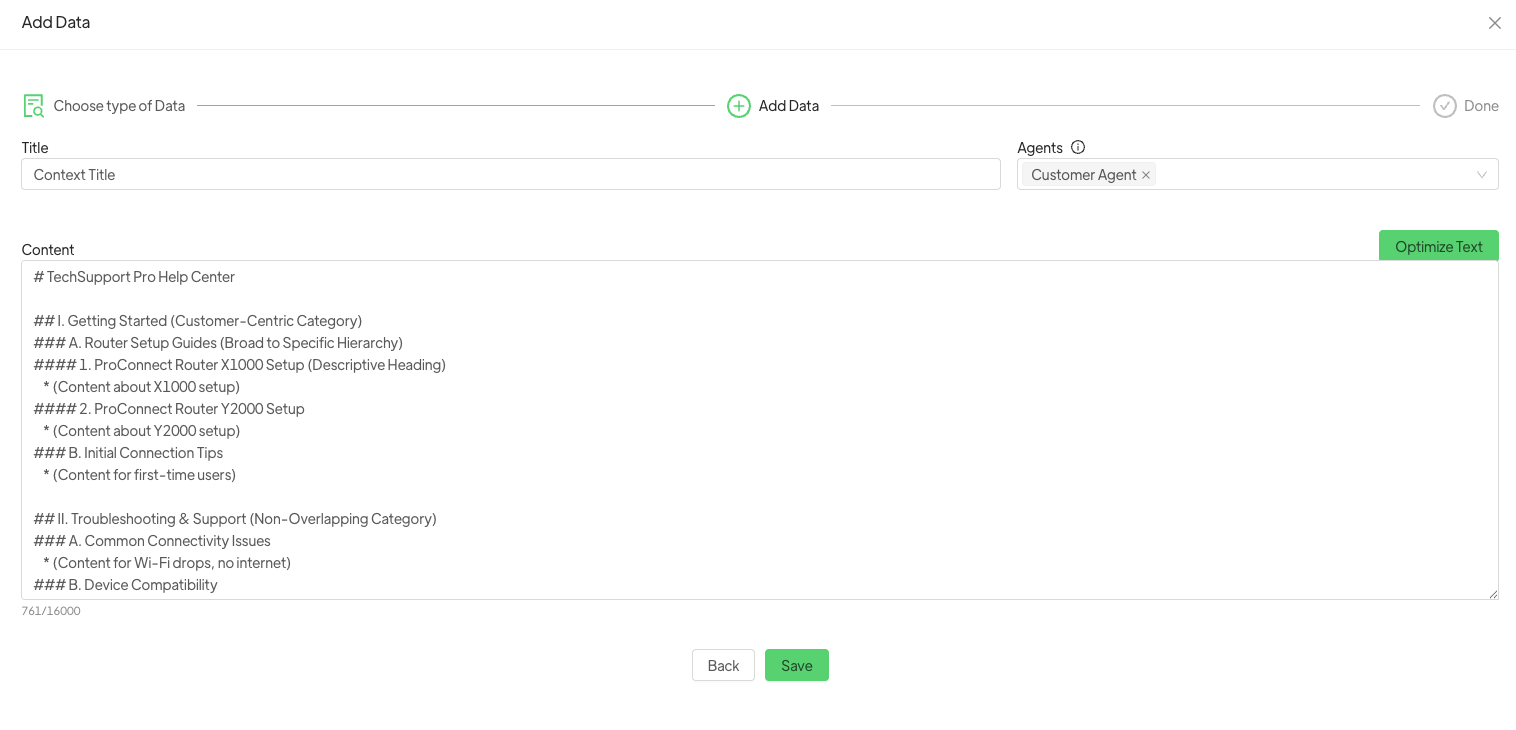
It is advisable to click on optimize text once the description has been entered so that it is optimised for better learning by the AI should the need arise.

Key Points for an Effective AI Document #

1. Provide Comprehensive Business Information:

  • Customer Interaction & Behavioral Data: Include historical chat transcripts, email exchanges, purchase history, and sentiment analysis data to help the AI understand customer patterns and needs.  
  • Product & Service Knowledge: Offer detailed specifications, user manuals, step-by-step guides, troubleshooting solutions, and Frequently Asked Questions (FAQs) for all your offerings.  
  • Company Policies: Clearly articulate policies related to returns, warranties, shipping, privacy, and billing.  
  • Backend System Data: Integrate with core systems like CRM and e-commerce platforms to provide real-time customer data (e.g., purchase history, account status) for personalized responses.

Example:

# TechSupport Pro Knowledge Base

## Product: ProConnect Router X1000
  **Description**: High-speed Wi-Fi 6 router for homes and small offices.
  **Features**: Dual-band (2.4GHz/5GHz), 4 Gigabit Ethernet ports, WPA3 security, easy mobile app setup.
  **Setup Guide**: Connect power adapter. Plug Ethernet cable from modem to WAN port. Connect devices to LAN ports or Wi-Fi.
## Service: Premium Support Plan
  **Details**: 24/7 phone and chat support, remote troubleshooting, priority service.
  **Eligibility**: Available for all ProConnect Router models.
## Company Policy: Return Policy
  **Standard Returns**: 30-day return window for unused products in original packaging.
  **Refunds**: Processed within 7 business days to original payment method.

2. Structure Content for AI Readability:

  • Customer-Centric Organization: Structure content based on how customers typically search for information, not your internal organizational structure.  
  • Logical Hierarchy: Organize information from broad topics to specific details, making it easy for the AI to narrow its search.  
  • Clear Categories & Headings: Use distinct, non-overlapping categories and descriptive headings that accurately reflect the content beneath them. Employ proper HTML tags (e.g., <h1>, <h2>) for headings, as AI models recognize these for understanding hierarchy.

Example:

# TechSupport Pro Help Center

## I. Getting Started (Customer-Centric Category)
### A. Router Setup Guides (Broad to Specific Hierarchy)
#### 1. ProConnect Router X1000 Setup (Descriptive Heading)
    * (Content about X1000 setup)
#### 2. ProConnect Router Y2000 Setup
    * (Content about Y2000 setup)
### B. Initial Connection Tips
    * (Content for first-time users)

## II. Troubleshooting & Support (Non-Overlapping Category)
### A. Common Connectivity Issues
    * (Content for Wi-Fi drops, no internet)
### B. Device Compatibility
    * (Content for connecting various devices)

## III. Account & Billing (Distinct Category)
### A. Managing Your Account
    * (Content for profile updates)
### B. Billing Inquiries
    * (Content for payment questions)

3. Craft High-Quality, AI-Parsable Content:

  • Standalone Information Chunks: Ensure all information is provided in full, complete sentences. Avoid fragments or internal references (e.g., “As you saw in our last example”), as AI presents information in discrete chunks.
  • Clear & Consistent Terminology: Use unambiguous words and avoid terms with multiple meanings within your knowledge base to prevent confusion and irrelevant search results.
  • Simple Language: Write concisely, using short, direct sentences. Avoid long, meandering, or overly complex sentences that are difficult for AI to parse.  
  • Minimize Non-Textual Core Information: Provide critical information primarily in text format. If images or videos are used, ensure accompanying text, alt text, or transcripts, as generative AI primarily processes text.  
  • Factual Accuracy & Consistency: All information must be consistently up-to-date, factually correct, and internally consistent across all articles.

Example:

# TechSupport Pro Content Quality

## Standalone Information Chunks
  *** Bad Example:** "Yes. Via app." (In response to "Can I set up the router using an app?")
  *** Good Example:** "Yes, you can set up your ProConnect Router X1000 quickly and easily using the dedicated TechSupport Pro mobile app."

## Clear & Consistent Terminology
  *** Bad Example:**
      * Article 1: "To access your** portal**, log in here." (Referring to customer account dashboard)
      * Article 2: "The** portal** on the router allows for cable management." (Referring to a physical opening)
  *** Good Example:**
      * Article 1: "To access your** customer dashboard**, log in here."
      * Article 2: "The** cable management opening** on the router allows for tidy cable routing."

## Simple, Direct Language
  *** Bad Example:** "It is imperative that users, upon encountering a cessation of network connectivity, initiate a diagnostic protocol by systematically verifying the operational status of all interconnected hardware components."
  *** Good Example:** "If your internet stops working, first check that all your router and modem cables are securely connected."

## Minimizing Non-Textual Core Information
  *** Recommendation:** If you have a diagram showing router ports, always include a text description of each port and its function. AI primarily processes text.

Important notes:
Always keep in mind that the documents needs to be updated or refreshed for any changes on your business processes. So please add/remove data when something (where AI context is involved) changes.

What are your Feelings
Share This Article :
  • Facebook
  • X
  • LinkedIn
  • Pinterest
Still stuck? How can we help?

How can we help?

Updated on July 21, 2025
HOW TO TRACK CLICKS ON TEMPLATE MESSAGE LINKS: UTMTemplate suggested by Artificial Intelligence (AI)

Powered by BetterDocs

Table of Contents
  • Key Points for an Effective AI Document
DEVELOP YOUR BUSINESS WITH SPOKI AND WHATSAPP
Try now for free

Contacts

  • info@spoki.it
  • +39 351 5495135
  • Informativa Privacy

Menu

  • Home
  • Prices
  • Functionality
  • Integrations
  • Artificial Intelligence
  • About us

Solutions

  • Marketing
  • Sales
  • Customer Care
  • Developers

Support

  • API Documentation
  • Blog
  • Case Study
  • Learning Center
  • Manual

Spoki.it © All rights reserved NextAI Srl P.IVA IT02717930743 Viale Francia snc, 72019 San Vito Dei Normanni (BR) Italy

Soluzioni

  • Marketing
  • Vendita
  • Assistenza Clienti
  • Developers
  • Italiano (Italian)
  • English
  • Español (Spanish)
  • Português (Portuguese (Brazil))
