
The button with a dynamic link for Whatsapp must necessarily be constructed in the following way: https://www.dominio.it/ + dynamic field
If, for example, you want to insert the link to an abandoned shopping cart directly into the button, you can do it in the following way. Let’s take Shopify as an example:
- Retrieve a link to an abandoned shopping cart from your site;
- Insert the first ‘fixed’ part and return it to the text part of the button (e.g. www.spoki.com/)
- select the dynamic part by choosing the dynamic field you are interested in (e.g. SHOPIFY_CHECKOUT_LINK)
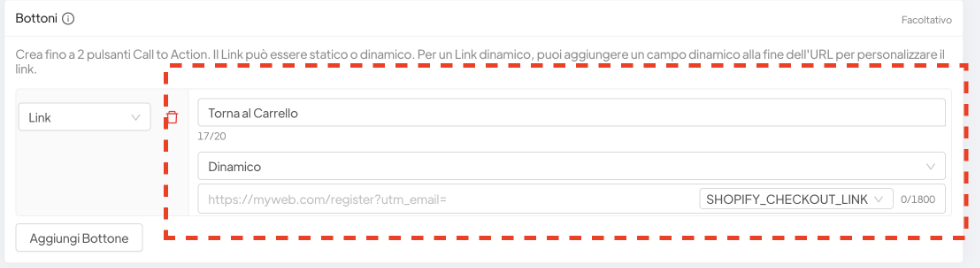
In the dynamic field Shopify sends the entire link (including the domain part).
Exclusively within the buttons, regardless of which dynamic field is inherent (it doesn’t have to be the Shopify dynamic field, but applies to any dynamic field) Spoki automatically removes the duplicated initial part.
This makes the link work.
The last step is to populate the example dynamic field (on the right) so that the link is clickable for Whatsapp approval. The link must lead to a page that actually exists.
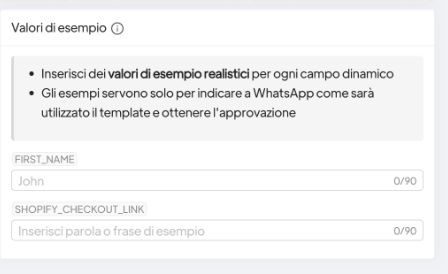
So all you have to do is take a really existing abandoned shopping cart link, copy the fixed part into the button and insert (on the right) the remaining part of the link into the SHOPIFY_CHECKOUT_LINK example field.