
If you use a List, and therefore a campaign, as the startup step of an automation, you can track, contacts that respond or do no action.
How?
Let’s consider the “Initial List” in this list (which you can place in the Campaign) are the contacts to whom you want to send a communication. You are interested in tracking who responds to the message so that you can stop sending it to them or have them log in to a later automation.
As in the image below, you can add the “Reply Any” step that allows you to track customers who have responded with any message to yours. Warning!!! Automatic responses that your customers have set up on their WA Business also apply.
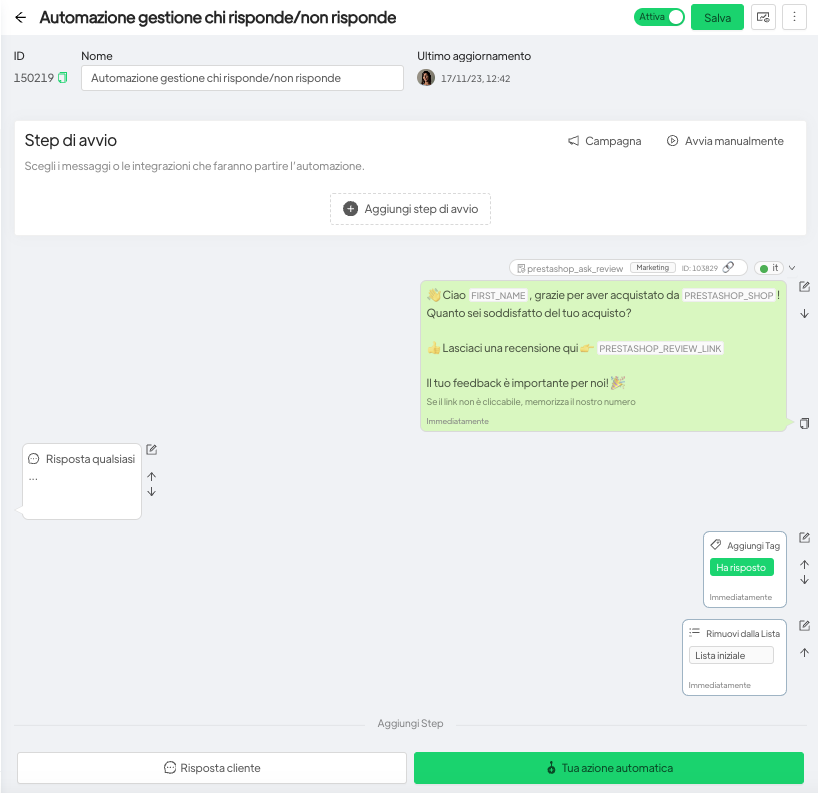
Only for those customers who have responded, the automation will assign the tag “Responded” and remove that contact from the initial list to which you sent the first template.
In this way, the contact list will no longer contain contacts who responded and you can use it to initiate a subsequent communication to customers who did not interact.



