
By activating this automation, you can set it to send a message to all customers who text your Spoki number any message, not related to another automation, during non-business hours (e.g., 10 p.m.).
Therefore, this automation will start only if the message received from the client is not matched by other automated response automations.
How to enable this automation?
Go to Company > Working Hours > Enable Working Hours
Select working hours.
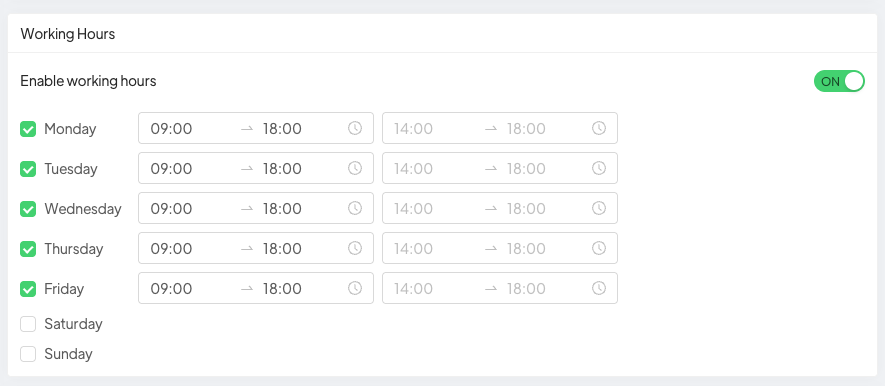
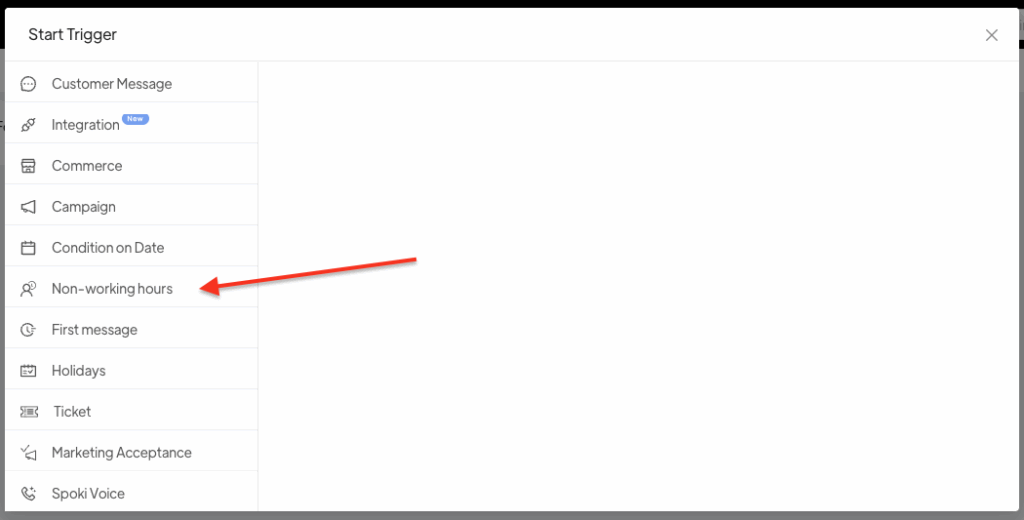
Once the working hours are set, go to Automations, select Empty, and create the automatic response automation by setting Non-working hours as the trigger.
Go to Automations > New > Working hours > Add
By clicking on “your automatic action” you can choose the template or write the free message to send.
In case you want to run a generic message to all clients writing at any time of the day, you can indicate as a working time, for example, only one hour in the night. In this case then only for the indicated working hours the message will not start, while during the rest of the day it will start.
The business hours entered will NOT be visible to clients.
Related articles #
How to update Spoki’s WhatsApp profile





