
Description: The “Delay” step allows you to configure an automatic waiting period before a contact proceeds to the next action. You can choose to wait for a specific duration, until a predefined date and time, or until a specific day of the week and time.
How It Works
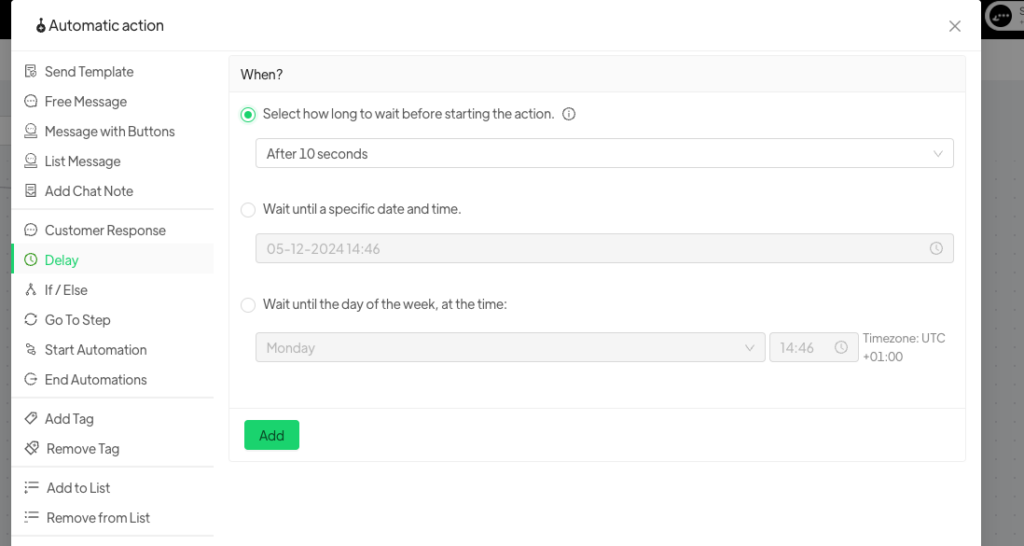
When selecting the “Delay” step, you can customize the waiting period according to different options:
- Preset Time: Select a specific period of time before the contact moves to the next action, e.g., 1h, 5’, 10”, and so on.
- Predefined Date and Time: Set an exact date and time so that the contact waits until the precise moment when these conditions are met. For example: “Wait until 25-12-25 to send the ‘Merry Christmas’ template.”
- Specific Day of the Week and Time: Choose a specific day of the week and an exact time so that the automation is triggered only when these parameters are met. For example: “Wait until Friday at 5:00 PM.”




