Manual sobre la configuración de llamadas de voz con IA, pruebas de calidad e integración en recorridos de cliente automatizados.
Ámbito: esta página describe el marco legal aplicable a las llamadas dirigidas a personas que se encuentran en España. Si realizas campañas hacia otros países, comprueba la normativa local correspondiente.
El Voice Agent es el «cerebro» de tu llamada telefónica. Utiliza tecnología de IA para conversar de forma natural con los clientes.
Configuración paso a paso:
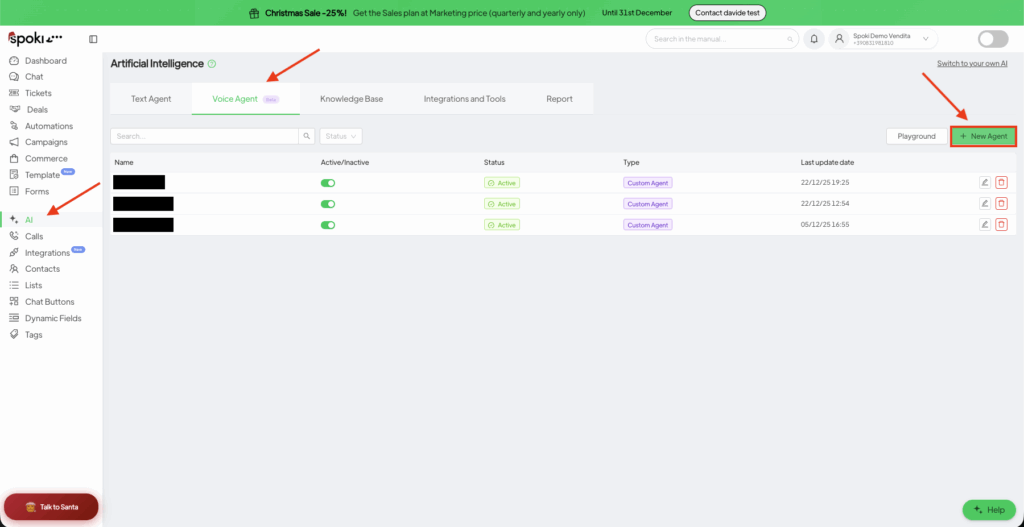
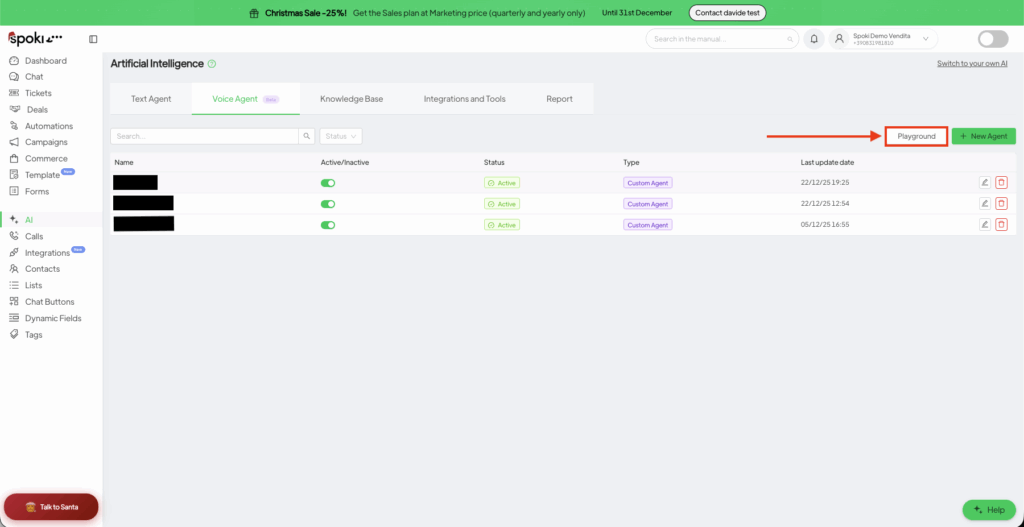
Accede al panel de IA: abre tu Dashboard de Spoki y haz clic en Inteligencia Artificial (AI) en la barra lateral izquierda.
Crea un nuevo agente: haz clic en la pestaña Voice Agent y después en el botón verde + Nuevo. Elige Custom Agent.
Ajustes principales:
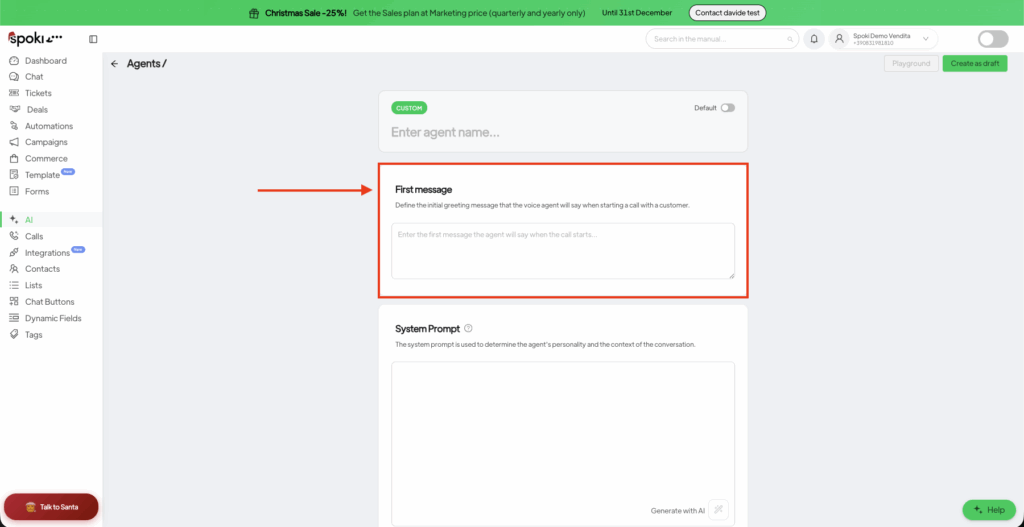
Nombre: identifica al agente internamente (por ejemplo, «Bot de confirmación de citas»).
Primer mensaje: es lo primero que dice la IA. Obligación legal: conforme al artículo 50 del Reglamento (UE) 2024/1689 de Inteligencia Artificial, aplicable desde el 2 de agosto de 2026, la persona que recibe la llamada debe ser informada con claridad, desde el inicio de la conversación, de que está hablando con un sistema de inteligencia artificial. Además, el artículo 96.2 del texto refundido de la Ley General para la Defensa de los Consumidores y Usuarios exige precisar al inicio de la conversación la identidad de la empresa por cuenta de la cual se llama y la finalidad comercial de la llamada. Incluye siempre ambas cosas en el Primer mensaje.
Ejemplo: «¡Hola! Soy el asistente virtual de Spoki, un agente de IA que llama en nombre de [Nombre de la empresa] para confirmar tu demo de mañana. ¿Es buen momento para hablar?»
⚠️ No configures el agente para que niegue ser una IA ni para que se haga pasar por una persona, aunque te lo pidan. Hacerlo infringe el Reglamento de IA de la UE y tu contrato con Spoki.
System Prompt: es la parte más importante. Define las «reglas de juego» del agente.
¿Quién es la IA? (por ejemplo: «Eres un asistente comercial servicial»).
¿Cuál es el objetivo? (por ejemplo: «Confirmar la fecha y la hora de la cita»).
Tono: (por ejemplo: «Profesional pero cercano»).
Cumplimiento: indica al agente que confirme que es una IA si se lo preguntan, que no recoja nunca más datos personales de los necesarios para el objetivo de la llamada y que finalice la llamada con cortesía si la persona pide no ser contactada de nuevo, registrando la oposición y facilitándole el número de referencia de esa oposición.
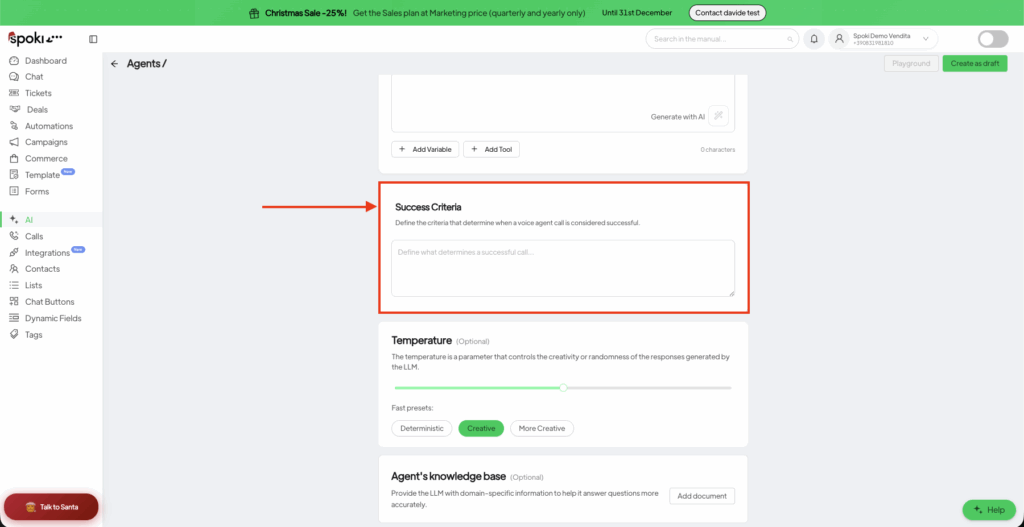
Criterios de éxito: define qué es una «victoria» (Win). La IA analizará la llamada para comprobar si se ha alcanzado ese objetivo.
No lances nunca una automatización sin probar antes su lógica.
Haz clic en el botón Playground, arriba a la derecha.
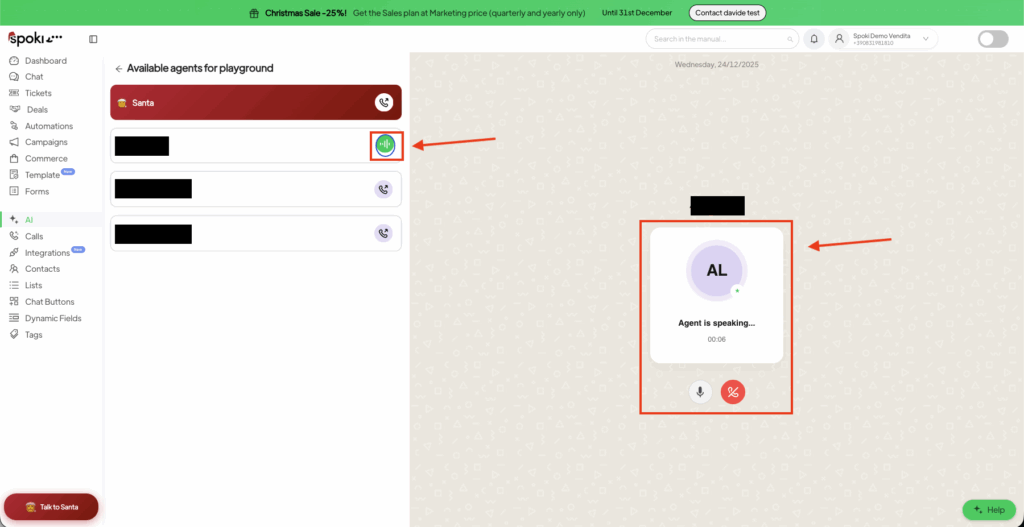
Selecciona tu agente y haz clic en Start Call.
Interacción en directo: habla con el agente como si fueras un cliente. Intenta ponerlo en apuros o hacerle preguntas fuera de tema para ver cómo reacciona.
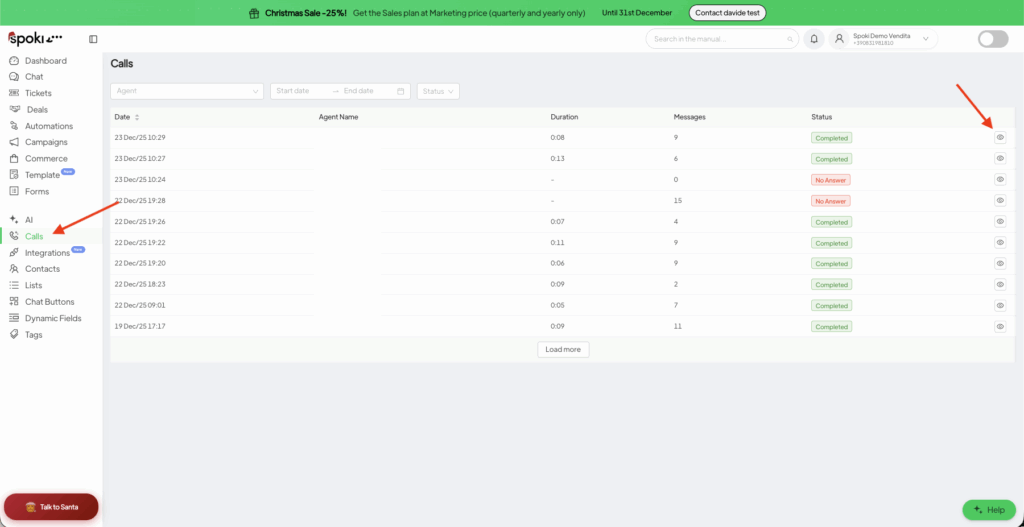
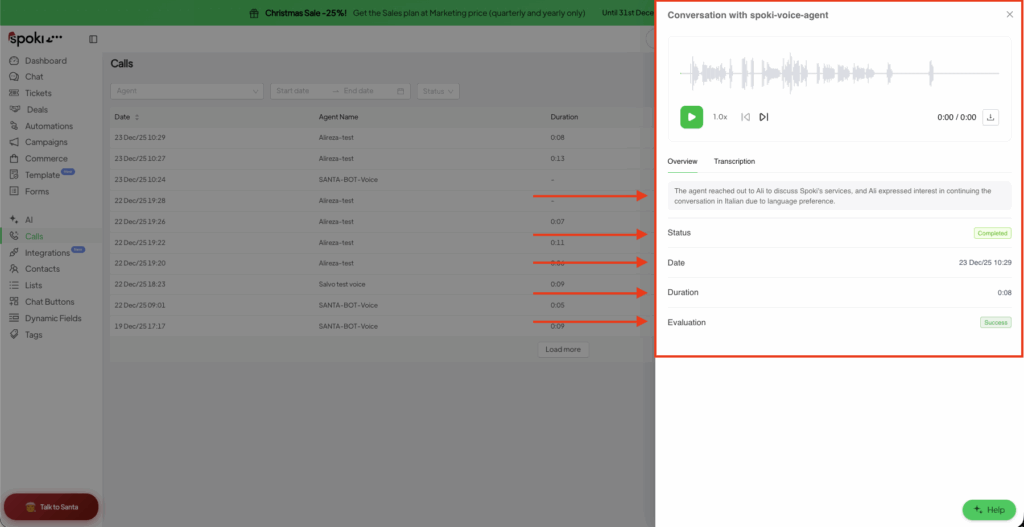
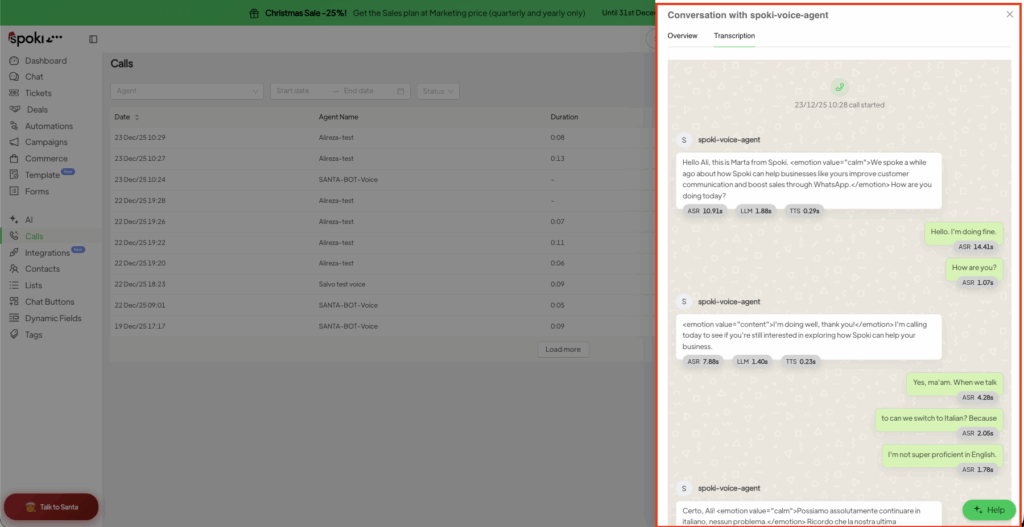
Analiza los resultados: ve al menú Calls en la barra lateral. Ahí puedes:
Escuchar la grabación de audio.
Leer la transcripción completa.
Ver el resumen generado por la IA.
Nota sobre las grabaciones: las grabaciones de las llamadas, las transcripciones y los resúmenes generados por la IA contienen datos personales. Accede a ellas solo cuando sea necesario conocerlas (need-to-know), define un plazo de conservación coherente con tu política de privacidad y elimina las llamadas de prueba que contengan datos personales reales cuando ya no sean necesarias.
Requisitos legales antes de lanzar llamadas de voz con IA
Las llamadas de voz basadas en IA están sujetas a normativa específica de la UE y española. Como responsable del tratamiento y responsable del despliegue (deployer) del Voice Agent, eres responsable de lo siguiente (consulta tu Contrato Spoki y el contrato de encargo del tratamiento):
Informa a las personas de que están hablando con una IA (Reglamento de IA de la UE, art. 50). Desde el 2 de agosto de 2026, toda llamada de voz con IA debe declarar, en la primera interacción, que el interlocutor es un sistema de inteligencia artificial. La plataforma Spoki soporta esta obligación mediante el Primer mensaje: no elimines nunca esa declaración. El incumplimiento de las obligaciones de transparencia del artículo 50 puede sancionarse con hasta 15 millones de euros o el 3 % del volumen de negocios total anual mundial del ejercicio anterior, aplicándose la cuantía mayor; si eres pyme o start-up, se aplica la menor de las dos.
Llama solo a contactos con consentimiento válido (art. 66.1.a de la Ley 11/2022, General de Telecomunicaciones, y art. 96.3 del texto refundido de la Ley General para la Defensa de los Consumidores y Usuarios). Los usuarios tienen derecho a no recibir llamadas automáticas sin intervención humana con fines de comunicación comercial sin haber prestado su consentimiento previo, y el uso de sistemas automatizados de llamada sin intervención humana requiere el consentimiento expreso previo del consumidor. Una llamada conducida íntegramente por un Voice Agent, sin operador humano, encaja en ese supuesto: necesitas consentimiento previo, específico y documentado. A diferencia de las llamadas comerciales con intervención humana (art. 66.1.b), que según la Circular 1/2023 de la AEPD pueden ampararse también en otra base de legitimación del artículo 6.1 del RGPD, incluido el interés legítimo, las llamadas automatizadas no admiten esa alternativa.
Respeta el horario legal de llamada (art. 96.2). Las llamadas comerciales no pueden efectuarse antes de las 9:00 ni después de las 21:00, ni en festivos o fines de semana. Si programas el Voice Agent para llamar automáticamente tras un evento —por ejemplo, el envío de un formulario—, configura una ventana horaria y un calendario que impidan que la llamada se lance fuera de ese margen.
Consulta los sistemas de exclusión publicitaria antes de cada campaña (art. 23 LOPDGDD). Quien realice comunicaciones de mercadotecnia directa debe consultar previamente la Lista Robinson y excluir a las personas inscritas. La consulta no es exigible respecto de quienes te hayan dado a ti su consentimiento para recibir la comunicación (art. 23.4 LOPDGDD); esa excepción cubre solo la consulta previa y solo las campañas basadas en el consentimiento, de modo que si actúas al amparo del interés legítimo la consulta sigue siendo obligatoria. El consentimiento es revocable en cualquier momento (art. 7.3 RGPD). Conserva la prueba de la consulta: su resultado caduca al mes.
Gestiona y documenta las oposiciones (art. 96.4 y 96.5). En la primera oferta comercial debes informar a la persona de su derecho a oponerse a recibir nuevas ofertas y de su derecho a obtener el número de referencia de esa oposición; si lo solicita, debes entregarle un justificante en el plazo máximo de un mes. Debes conservar durante al menos un año los datos de quienes se hayan opuesto, junto con el número de referencia asignado, y tenerlos a disposición de las autoridades competentes.
Informa sobre la grabación y la transcripción (RGPD, arts. 13-14). Las llamadas realizadas a través de Spoki Voice se graban, se transcriben y son resumidas por la IA. Tu política de privacidad debe cubrir este tratamiento, y el agente debería mencionar la grabación al inicio de la llamada, con un enlace o referencia a la información completa. Conserva las grabaciones solo el tiempo necesario y limita el acceso al personal autorizado.
Utiliza la numeración que exige la normativa española. Las ofertas comerciales no solicitadas deben realizarse desde un número de teléfono identificable (art. 96.5). Los operadores españoles bloquean las llamadas con identificación de llamante (CLI) vacía o con numeración española no asignada, así como las llamadas procedentes del extranjero que presentan un CLI español, y no se pueden utilizar rangos de numeración móvil para llamadas comerciales no solicitadas (Orden TDF/149/2025). Si tu empresa está incluida en el ámbito de la Ley 10/2025 de servicios de atención a la clientela —empresas de servicios básicos de interés general (agua, gas, electricidad, transporte, servicios postales, comunicaciones electrónicas y servicios financieros) y grandes empresas—, tus llamadas comerciales deberán realizarse desde el rango NXY = 400, de forma exclusiva una vez finalizado el periodo transitorio de seis meses abierto por la Resolución de 14 de abril de 2026. Los números 400 se destinan solo a originar llamadas salientes y no admiten llamadas entrantes, por lo que la información de contacto y la forma de oponerse deben facilitarse dentro de la propia llamada.
Comprueba si tu sector tiene restricciones adicionales. En el suministro de energía eléctrica, el Real Decreto 88/2026 prohíbe a las comercializadoras —y a cualquier sociedad que actúe en su nombre— realizar publicidad y prácticas de contratación no solicitadas por vía telefónica cuando el consumidor sea persona física, salvo que exista una petición expresa, inequívoca e informada y para una finalidad específica, o que la llamada la origine el propio consumidor, sin perjuicio del interés legítimo en los términos de la Circular 1/2023 de la AEPD. En todo caso, la comercializadora debe grabar la totalidad de la llamada, con independencia de quién la origine, incluida la información precontractual. La misma prohibición se aplica a las empresas que prestan servicios de agregación. La norma se refiere a la electricidad; el gas natural no está incluido.
Si usas el agente para atender llamadas entrantes, no puede ser tu único canal. Las empresas incluidas en el ámbito de la Ley 10/2025 no pueden emplear contestadores automáticos u otros medios análogos como medio exclusivo de atención a la clientela: el usuario debe poder pedir, desde el menú principal, ser atendido por una persona física.
Evalúa el riesgo antes de un uso a gran escala. Si utilizas el Voice Agent de forma sistemática o sobre listas de contactos amplias, realiza una Evaluación de Impacto relativa a la Protección de Datos (EIPD) junto con tu Delegado de Protección de Datos o tu asesor en privacidad.
Spoki (NextAI S.r.l.) actúa como encargado del tratamiento de los datos en estas llamadas y se apoya en Proveedores de Servicios de IA seleccionados, en las condiciones previstas en tu Contrato y en el contrato de encargo del tratamiento. Un uso indebido del Voice Agent que infrinja estas reglas puede dar lugar a la suspensión del Servicio conforme al Contrato.
Esta sección se facilita con fines informativos y no sustituye al asesoramiento jurídico.
Cuando el agente esté listo, puedes integrarlo en un flujo de trabajo más amplio (por ejemplo, llamar a un lead unos minutos después de que rellene un formulario).
⚠️ Antes de activar la acción Voice, comprueba dos cosas. Primera: que tu formulario recoja un consentimiento opt-in específico y libremente prestado para las llamadas de voz automatizadas, separado del consentimiento general de marketing, y conserva la prueba. Segunda: que la automatización respete el horario legal; si el formulario se rellena un sábado o a las 22:00, la llamada no puede salir en ese momento, sino dentro de la siguiente franja hábil entre las 9:00 y las 21:00 de un día laborable.
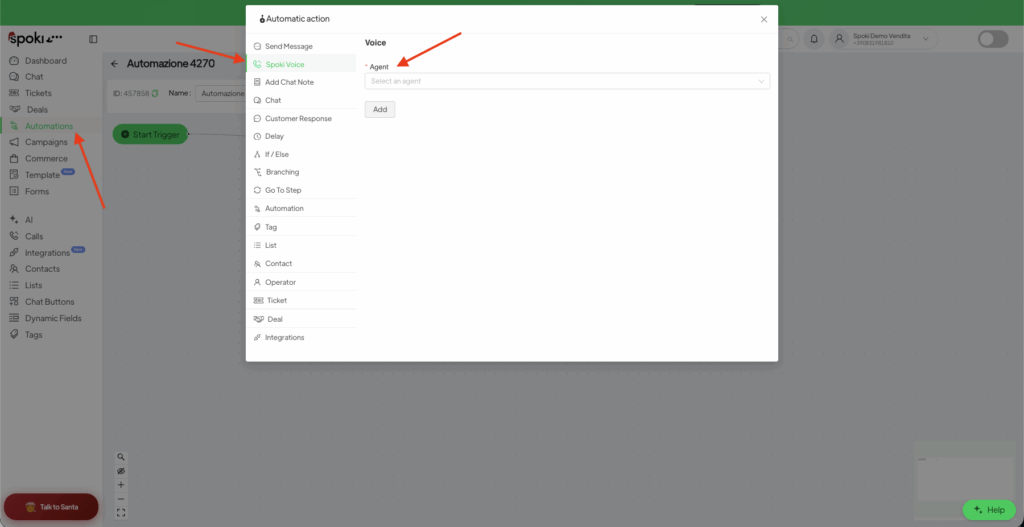
Ve a Automatizaciones y haz clic en + Nuevo.
Añade una Acción y selecciona Spoki Voice.
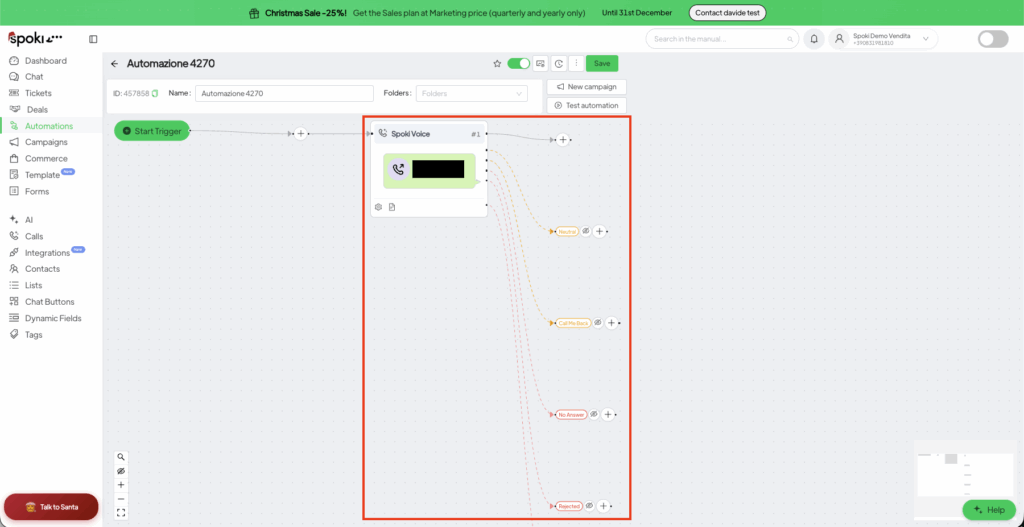
Ramificación inteligente: tras añadir la acción de voz, Spoki crea ramas según lo ocurrido durante la llamada:
Success (Éxito): se ha alcanzado el objetivo (por ejemplo, cita confirmada).
Neutral (Neutro): la conversación se ha producido pero sin un resultado concreto.
Call Me Back (Llámame): el cliente ha pedido que se le vuelva a contactar más adelante.
No Answer/Rejected (Sin respuesta o rechazada): usa esta rama para enviar automáticamente un mensaje de WhatsApp de seguimiento.
Dado que un Voice Agent graba, transcribe y trata la voz de las personas a las que llama, tú —como titular de la cuenta— eres el responsable del tratamiento y respondes de su uso lícito. Buena parte del cumplimiento diario está integrado directamente en tu prompt.
En el Primer mensaje, declara siempre, antes que cualquier otra cosa, (1) que el interlocutor es una IA, (2) quién llama, por cuenta de quién y con qué finalidad comercial, y (3) que la llamada se está grabando. Ejemplo:
«Hola, soy un asistente virtual de [Empresa]. Te llamo para [motivo]. Esta llamada se graba y se transcribe con fines de [gestión de citas / atención al cliente]. ¿Te parece bien que continuemos?»
En el System Prompt, añade reglas explícitas para que el agente se mantenga conforme, por ejemplo:
No solicites ni registres datos de categorías especiales (salud, religión, opiniones políticas, etc.). Si el cliente los facilita espontáneamente, no los repitas.
Recoge solo los datos estrictamente necesarios para el objetivo declarado.
Si el cliente se opone a la grabación, tenlo en cuenta con cortesía, no insistas y finaliza la llamada.
Si el cliente pide no ser contactado de nuevo, regístralo, comunícale que puede obtener el número de referencia de su oposición y finaliza la llamada.